Sunday, December 13, 2009

Flash Your Christmas Tree

Today the wife and I gathered our three children to take our annual Christmas portrait in front of our Christmas tree. The room lighting was not very good so I setup two off camera slave flashes (580 EX II and 430 EX) on light stands and triggered them using the Canon 7D's built-in master flash. I love this feature on the 7D!

I wanted to capture the available light of the Christmas tree but after a few test shots with the children I knew I would have to go with a faster shutter speed to minimized motion blur because our youngest would not or could not stand still. This resulted in a 1/60 second shutter speed with an aperture of 4.5. to get a shallow depth of field. I setup the camera to manual mode (M) and took a few test shots to dial in the flash to get a decent exposure.

We took several images with all five us but I was not very happy with any of them because the lights on the Christmas tree just didn't show up at all. The children were becoming restless so I made the decision that what we had taken was going to have to do.

After the boys were off in their rooms playing my wife and I continued the photo session with a few images of both of us. Me being somewhat lazy on that Sunday afternoon I left the camera on the same settings as before and again I wasn't happy with the results.

What to do? I decided to slow the shutter shutter speed by a stop or two while leaving the aperture at 4.5 and I also lowered the flash output by 1 stop. Wow, what a difference it made. Now this is what I had in mind when we started.

Next year our youngest will be a little bit older and hopefully a little more able or willing to stand still so I can use the slower shutter speed and get those Christmas tree lights to really glow in our family Christmas portrait.


All images copyright Daniel Ray Photography.

Wednesday, November 25, 2009

Photography Quotes

Some of my favorite photography quotes...
  • "There are always two people in every picture: the photographer and the viewer." ~Ansel Adams

  • "You don't take a photograph, you make it." ~Ansel Adams

  • “Photography takes an instant out of time, altering life by holding it still.” ~Dorothea Lange

  • "It's weird that photographers spend years or even a whole lifetime, trying to capture moments that added together, don't even amount to a couple of hours." ~James Lalropui Keivom

  • “Whether he is an artist or not, the photographer is a joyous sensualist, for the simple reason that the eye traffics in feelings, not in thoughts.” ~Walker Evans
All images copyright Daniel Ray Photography.

Friday, October 16, 2009

Details of a Ferrari

There is nothing like an exotic Italian sports car. Most of us have seen them speed by at 100+ MPH and leave you in their dust. In this series I chose not to photograph the entire car, but rather focus on some of the finer details that you can't see when they pass you in a blurrrrr..

Front hood
Wheel, tire and disc brake
Drivers side front panel and door
Tail with see through engine cover.
Right rear corner
Dashboard
Exhaust

All images copyright Daniel Ray Photography.

Friday, October 09, 2009

Photoshop Tip - Merge All Visible Layers

Like most other digital photographers I occasionally use Adobe Photoshop (PS) to edit and enhance my images. I'm always looking for better or faster ways of doing things in PS so as I run across great PS tips I will be sharing them with you guys. So without any further delay here is PS tip #1.

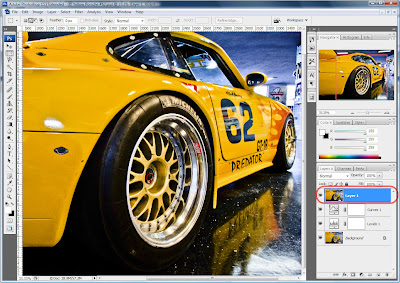
When editing my images in PS I typically create mutliple adjustment layers. As you can see in the image below I have the original (background) image layer, a levels adjustment layer and a curvers adjustment layer.


When I finished making adjustments to the image I almost always need to sharpen the entire image using either one of the sharpening filters or by using the High Pass filter (Filter > Other > High Pass...) which is my favorite. In order to apply the sharpening filter to the original image plus all the adjustments the multiple layers must be combined into one layer. This is done my pressing CTRL+ALT+SHIFT+E which will create a new top level layer that is a merge of all visible layers.

Now you can select the new layer and apply your favorite sharpening filter to the entire image.


All images copyright Daniel Ray Photography.

Monday, September 14, 2009

Glamour-ish

This past Saturday I asked my wife to model for me so I could practice portrait lighting and posing. I know very little about how to properly pose or light a person for a portrait, but from reading online forums, books and studying other photographer's portrait work I've picked up a few tips for posing and lighting. I wasn't trying to create "glamour" style images but they seem to have come out that way.

Our kitchen and breakfast area has excellent defused northern light streaming in through the two large windows so I decided to use that room for this shoot. We moved the breakfast table and chairs out of the room and I tacked a large 6' x 14' piece of black felt cloth about 4 feet up on the wall to act as the backdrop. The cloth hung down the wall with enough material leftover so that I could pulled in away from the wall to cover the floor. This allowed me to have the same color on the floor and the wall behind her. The use of a solid color backdrop allows the viewer of the image to focus on what's important, the person and not become distracted by the background.

The lighting for all of these images was natural sunlight coming in from two windows located to the right of the camera. I also used a 24 inch round silver reflector that was used to reflect the sunlight on to the side of her face opposite the windows. The reflected light reduces the shadows and provides even lighting across her face which helps smooth the look of the skin.
1. I like this image with the exception that you can not see her hair very well. I also don't like the way her legs are crossed, but I'm not sure how else I would have had her arranged them.


2. This was my favorite image from the day. I like the crossed legs, the color of her hair and the lighting on her face. If I had to change anything I'd have her move her legs so they are more straight up and down like in the image below this one.
3. This one is similar to the above but the crossed legs are more straight up and down which I like better. She thinks there is too much symmetry in the face, hands and hair.
4. This one was all her, she started moving her hand through her hair and I grabbed this shot. The lighting across her face and the focus is off a tad bit but I like the feel of movement in this image.

If there is something I learned from this session it is that I want to have more energy in my portrait images. These are a little to "posed" for my liking so next time I'm going to use a fan and see if we can get her hair moving in the wind or something like that to give them more life. We are both very happy with the results and we're planning on doing more of this style later.

All images copyright Daniel Ray Photography.